THREAT ADVISORY · MOBILE BANKING FRAUD
RemControl: an Android trojan that lets fraudsters bank from your customer's phone
Built partly with an AI assistant that thought it was coding a quiz app, RemControl takes over the device instead of stealing the OTP. Here is how it works and what a bank app can see while it happens.
On 23 September 2026, Group-IB published its analysis of RemControl, an Android banking trojan that had not been documented before. It has been in the wild since July and has gone after customers of more than 30 banks. None of them are in India yet. We think Indian banks and lenders should read about it anyway, because the way it works gets straight past the two checks they lean on most, device binding and the OTP.
The short version
- What it is: a remote-access banking trojan for Android, offered to affiliates as malware-as-a-service
- Timeline: the first command server domain was registered on 12 May 2026; the first sample reached VirusTotal on 19 July
- Who it targets: customers of 30+ banks in Italy, France, Spain, Poland, Portugal, Canada and the GCC, with Italy and France as the main targets
- What it takes: banking PINs, mobile banking codes, card expiry dates and the phone's unlock pattern
- Who runs it: an affiliate Group-IB tracks as UNKK. Group-IB sees a possible link to UNKN, an affiliate botnet that distributed the Medusa trojan, but says the evidence is not strong enough to confirm it
- The odd part: much of the backend and the fake login screens appear to have been written with an AI assistant that was told it was building a quiz and parental-monitoring app
How victims get infected
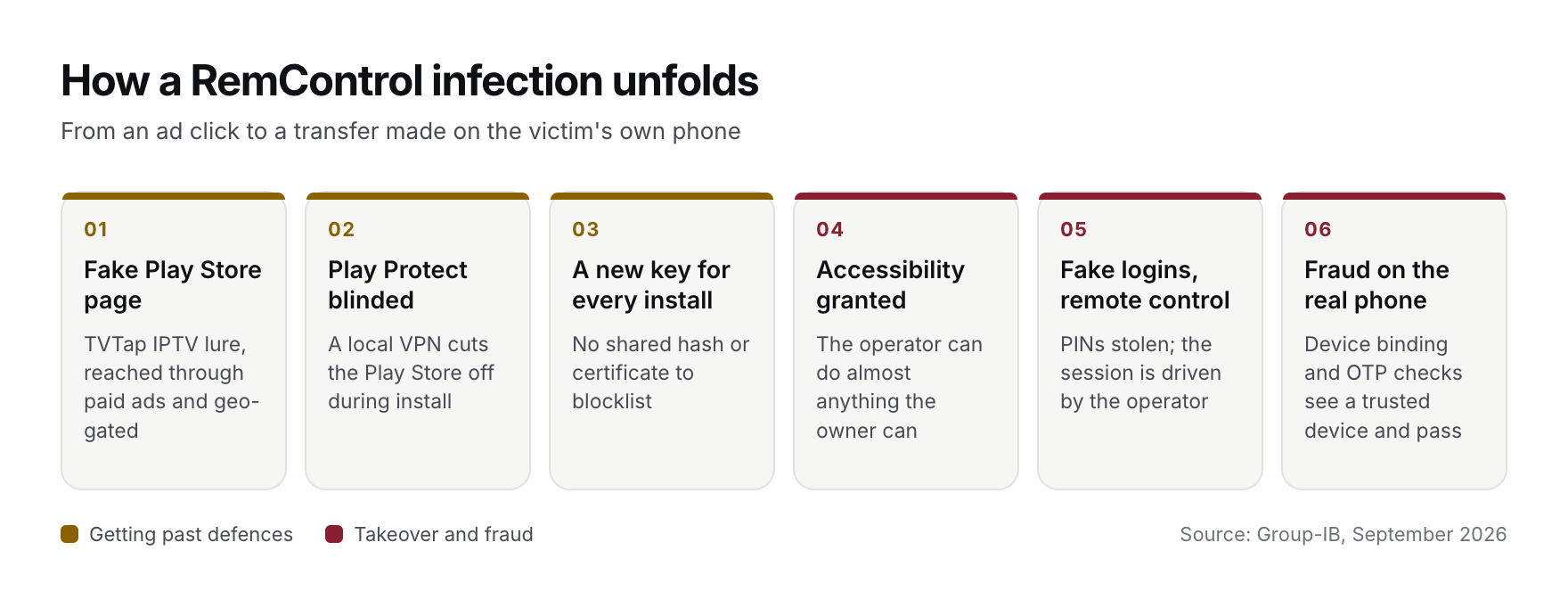
The bait is TVTap, a popular third-party IPTV app. TVTap isn't on Google Play, so its users are used to installing it from websites, and a download page dressed up as a Play Store listing doesn't look strange to them.
Paid ads are one confirmed route in. Group-IB found two Meta Pixel trackers on the fake pages, which points to campaigns run through Meta's ad platform. In the Italian campaign it examined, the pages served the APK only to mobile browsers with an Italian IP address, so researchers and automated scanners elsewhere got nothing. The two main download domains were registered on 10 July, nine days before the first sample showed up.
Getting past Android's defences
After the victim opens the download, a fake "TVTap update" screen appears. While the victim looks at it, the dropper asks for VPN permission and starts a local VPN whose only job is to cut the Play Store app off from the network, which stops Play Protect from checking the install as it happens. It then creates a brand-new signing key on the phone and signs the payload with it, so no two infections share a file hash or certificate. The payload goes in through Android's session installer and asks for Accessibility Service access straight away. If the victim agrees, the operator can do almost anything a person holding the phone could do.
Its text strings are scrambled, and newer builds add a packer keyed to each build's own signing certificate. A blocklist of hashes or certificates won't catch this family.
What it does once it is in
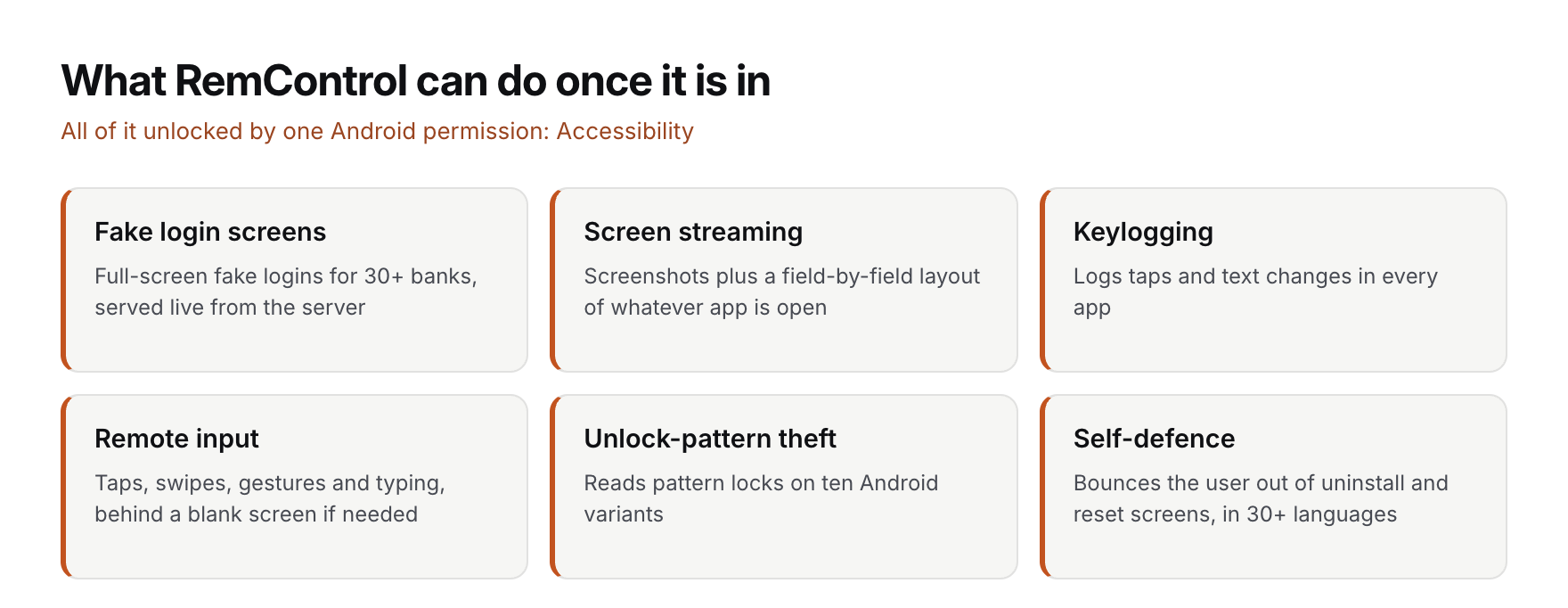
Everything below runs through Accessibility, which Android designed for screen readers and other assistive apps.
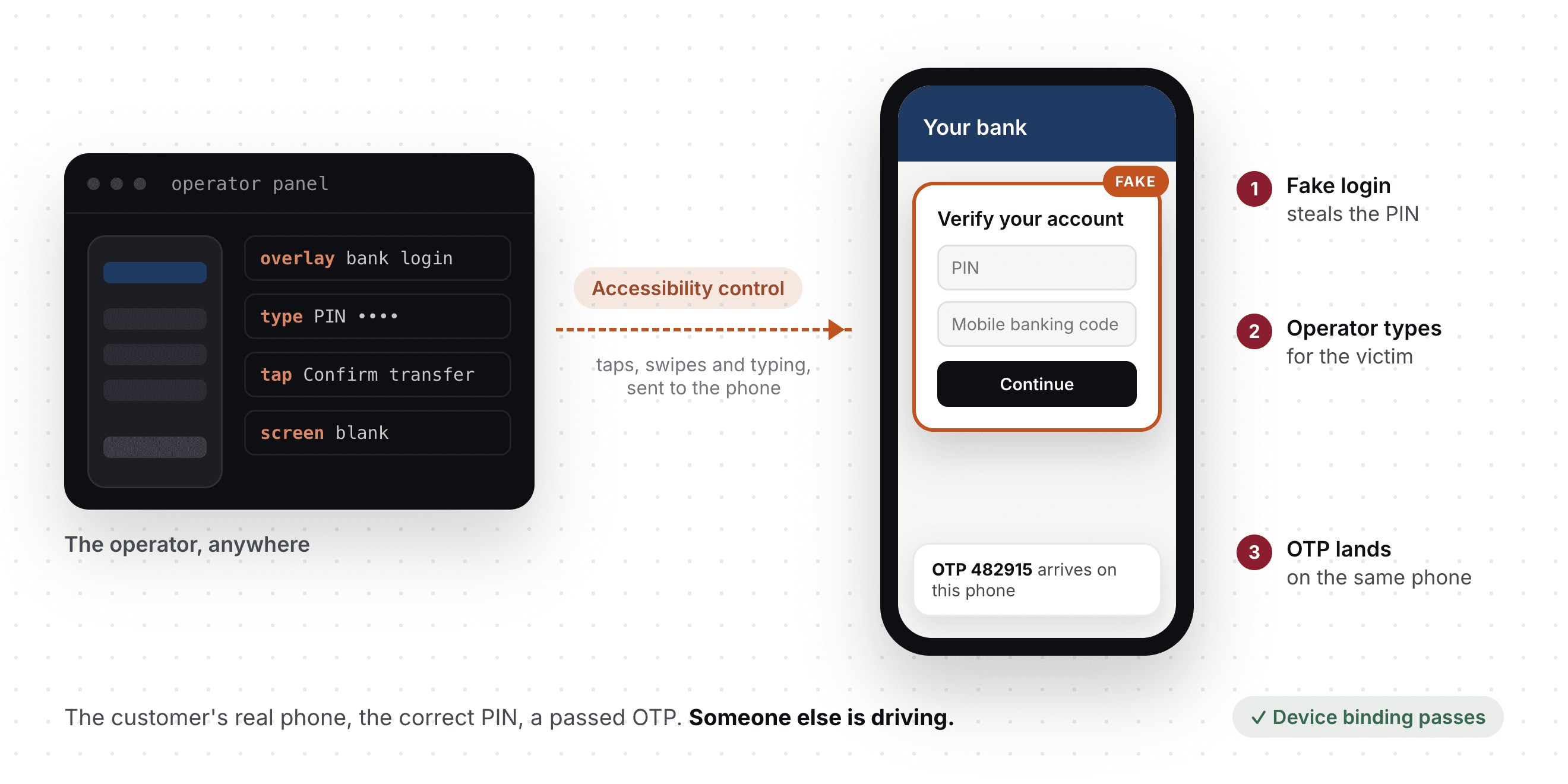
- Fake login screens. RemControl watches which app is in the foreground. When a targeted bank app opens, it draws a full-screen fake login over it, fetched from the command server at that moment. After the victim submits their details, the fake screen closes and the real app is sitting underneath as if nothing happened.
- A target list it can change on the fly. No bank list is stored on the phone. Soon after the device connects, the server asks it which apps are installed and pushes a fake screen for each bank it finds. Supporting another bank is a change on the server, and phones that are already infected pick it up.
- Screen streaming. Alongside screenshots, it uploads the layout of whatever app is open, field by field, so the operator's software can find the PIN box and fill it without anyone looking.
- Keylogging and remote input. It logs taps and text changes in every app, and it can tap, swipe, perform gestures and type for the operator. The operator can even put up a blank screen with a message while working, so a transfer goes out from the victim's own phone without the victim seeing it.
- Stealing the unlock pattern. It reads the pattern-lock grid on ten Android variants, from stock Android to Samsung One UI, Xiaomi MIUI, OPPO ColorOS, OnePlus and Huawei.
- Defending itself. If the user opens app management, the Accessibility settings or the factory-reset screen, it notices (it matches those screens in more than 30 languages) and sends them straight back out.
This changes how the fraud looks from the bank's side. The transfer comes from the customer's real phone, in a session they opened, with the correct PIN. RemControl doesn't need to steal an OTP, and nothing in Group-IB's list of its capabilities or its full command set reads SMS. The criminal simply uses the phone the OTP arrives on, so every device-binding and OTP check sees a trusted device and passes.
The command servers, and the AI that helped build them
The trojan finds its command server by reading an encrypted address posted in Telegram channels. That lets the operator move servers without shipping a new build. Day-to-day traffic goes over a WebSocket, with plain HTTP as a fallback. The server the phones talk to is only a proxy. The real operator panel sits behind it.
That panel's documentation was exposed while Group-IB was looking into the campaign. It describes bot management, an editor for overlay templates, a viewer for stolen credentials, macros that run scripted command sequences, and a recorder that plays back remote sessions frame by frame. A builder lets each affiliate produce its own APK with a custom app name, package name and lure page.
The AI trail is where Group-IB found the most unusual evidence. In the proxy server's API documentation, stolen banking credentials are "quiz answers" and remote control is "parental monitoring", and the panel describes a victim as "a person staring at the quiz". Group-IB's reading is that the assistant writing the code did not know what it was building. One overlay still had the assistant's entire chat reply pasted at the bottom of its HTML, change notes included. Some overlay files carry Russian-language code comments.
For defenders, the AI angle matters. Building a banking-fraud platform like this used to take a skilled team. Large parts of this one were built by someone willing to lie to a chatbot about what they were making, and we expect more families to arrive this way, and faster.
Why this matters in India
RemControl has not been seen going after Indian banks, though Group-IB says it may expand beyond its current targets. Because the target list and the fake screens come from the server, adding a country mostly means writing new fake screens, not rebuilding the malware.
The playbook is also already familiar here. Fraud gangs in India have been pushing sideloaded APKs and talking victims into screen-sharing for years. In September 2022, CERT-In warned Indian bank customers about SOVA, an Android trojan that used Accessibility to put fake screens over banking apps and to tap and swipe on the victim's behalf (advisory CICA-2022-3093). And the controls Indian lenders depend on most (SIM binding, device binding, OTPs and MPINs) are the ones that pass without complaint when the fraud runs on the customer's own registered phone.
Malware that hands a criminal the customer's own phone makes it hard to argue that a passed OTP check proves who is transacting.
What DevizeScore sees during a RemControl-style session
DevizeScore runs inside the bank's app as an SDK. At the moments that matter (login, adding a beneficiary, making a payment) it reads the state of the device and how the session is being used, and the bank's server gets a risk score back. RemControl changes how it looks with every install, so we don't try to recognise the file. We look for the things it has to do to commit the fraud.
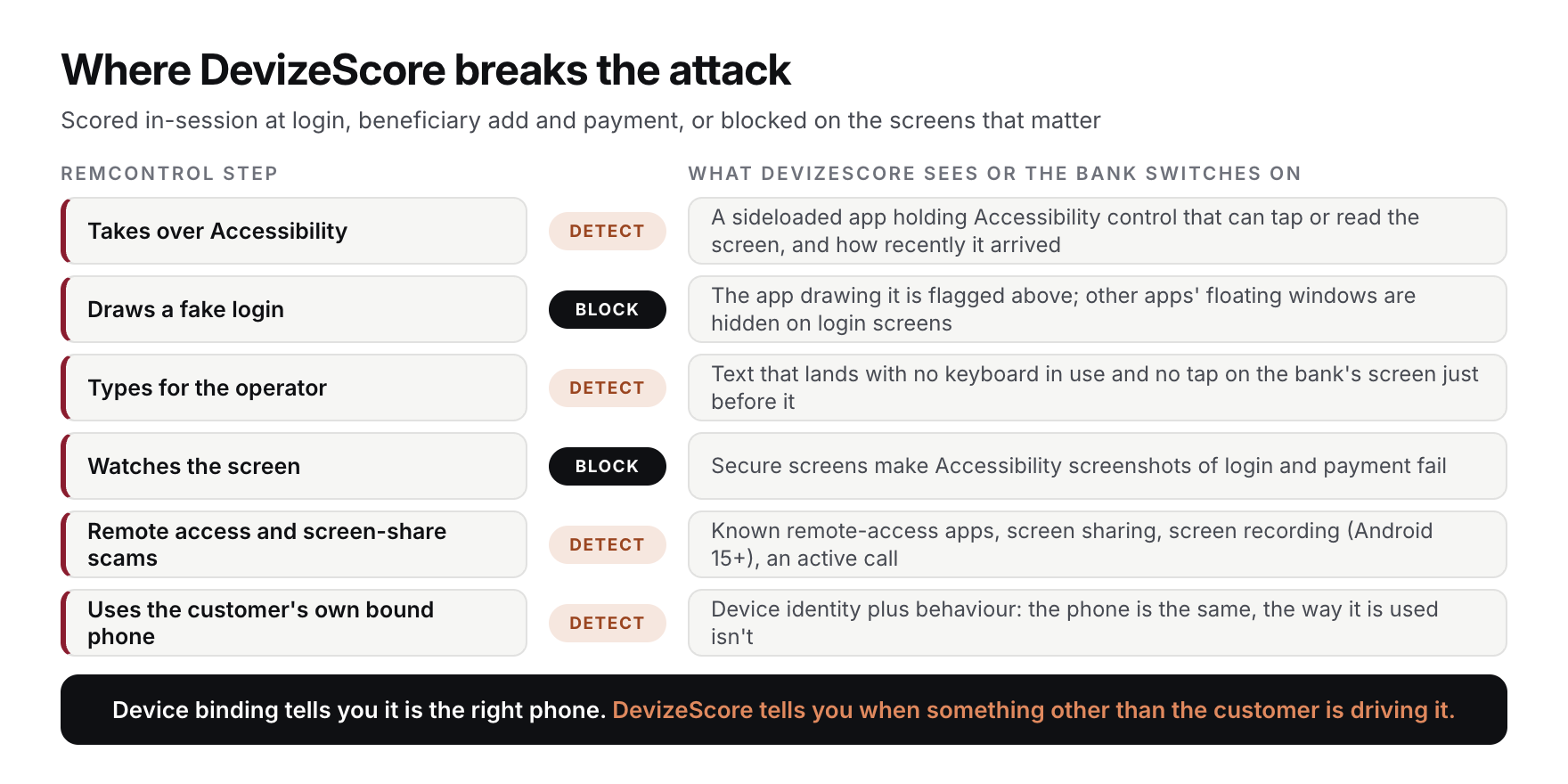
| RemControl step | What DevizeScore sees | What the bank can do |
|---|---|---|
| Takes over Accessibility | Any app holding Accessibility control that can tap or read the screen and was sideloaded rather than shipped with the phone or installed from an app store, and how recently it arrived. Screen readers and store-installed tools are ignored, and their names never leave the phone | Step up or block high-risk actions while such an app is active |
| Draws a fake login over the bank app | The fake screen is drawn through Accessibility, so the first row already flags the app that draws it | Hide other apps' floating windows on login screens (see below) |
| Types for the operator | Text that lands in a field with no keyboard in use and no tap on the bank's own screen just before it | Score the session as taken over even when the PIN and OTP are correct |
| Watches the screen | Nothing on the device reports Accessibility screenshots, so the bank blocks them instead (see below) | Turn on secure screens for login and payment |
| Remote-access and screen-sharing scams | Known remote-access apps, screen sharing, screen recording or casting of the bank app (Android 15 and later), and an active phone call during the session | Hold the transaction and confirm with the customer through another channel |
| Uses the customer's own bound phone | Device identity together with behaviour: the phone is the same, but the way it is being used isn't | Stop takeovers that SIM binding and OTPs let through |
Some of RemControl's tricks are better blocked than detected. Android gives apps no way to tell when an Accessibility service takes a screenshot, for example. Our integration guide shows bank teams how to switch on three Android protections on the screens that matter:
- Secure screens. With Android's secure-window setting on the login and payment screens, Accessibility screenshots of those screens fail.
- Hidden sensitive fields. On Android 14 and later, PIN and card fields can be marked as hidden from Accessibility services that don't declare themselves assistive tools. That keeps them out of the screen map RemControl sends home. Malware can lie about being an assistive tool, so treat this as one layer among several.
- Fewer overlays. On Android 12 and later, the app can ask the system to hide other apps' floating windows while it is open. Overlays drawn through Accessibility are not covered, which is why spotting the app behind them matters.
Why this approach holds up
The RemControl builder gives every affiliate its own app name, package name and Accessibility label, and the dropper signs every install with a fresh key. None of that hides an unknown, sideloaded app holding Accessibility control during a banking session, and when the operator types by injecting text instead of using the keyboard, that shows up too. We score those facts during the session, while the transaction is still waiting for approval.
Device binding tells you it is the right phone. DevizeScore tells you when something other than the customer is driving it.
Is your mobile app ready for RemControl-style attacks? Write to us at support@devizescore.com. We will put DevizeScore into a test build of your app and show you, side by side, what your current controls and DevizeScore each flag when an Accessibility app takes over a session.
Indicators of compromise
Selected indicators from Group-IB's report; the full list, including file hashes, is at the source link. Defanged; do not click.
| Type | Indicator |
|---|---|
| Lure domain | tvtap-hd[.]app |
| Distribution host | vpn[.]doneplay[.]site |
| Distribution host | cdn[.]dlmafi[.]top |
| Final download URL | tvtap-liveapp[.]com/dl.php |
| Command server domain (early campaigns) | bnbnhura[.]top |
| Operator panel | definatelynoone[.]com |
| Operator panel IP | 157[.]90[.]179[.]116 |
| Telegram dead-drop | telegram[.]me/ftestera |
| Telegram dead-drop | telegram[.]me/+Psyt04xu-cRjMTg0 |
| Meta Pixel IDs on lure pages | 997470916598588, 1909605966397328 |
Sources
- Group-IB, "RemControl" Android banking trojan analysis, 23 September 2026
- Infosecurity Magazine, coverage of Group-IB's RemControl research, 25 September 2026
- CERT-In, advisory CICA-2022-3093 on the SOVA Android trojan, September 2022